Have you ever opened a folder containing files called final, final-new, and final-really-new? Those names try to record a project's history, but they rarely explain what changed or why. Git offers a more structured approach. It records versions of files and gives collaborators tools for developing changes without depending on a single chain of renamed copies.
Recording Changes
Scott Chacon and Ben Straub's Pro Git explains version control as recording changes over time so earlier versions can be recalled. It lets users compare versions and investigate who changed something. Git is a distributed version-control system, meaning a clone can include the repository's history as well as its current files.
For a school programming team, that history could help explain when a working feature began producing an error. Instead of searching several vaguely named folders, the team can compare recorded changes. The example is hypothetical, but it shows why a useful history is more than a backup of the latest file.
A record also needs an explanation. A short message describing the purpose of a change gives future readers a reason to examine that version. The tool records the work; the team supplies its meaning.
Working on Separate Paths
Pro Git's branching chapter explains how developers can create a branch, work on it, and later merge its changes with another branch. A branch provides a way to develop a feature while a separate line of work continues.
Imagine one student improving a website's navigation while another corrects its calendar. Their work can proceed separately and then be combined. If both edit the same part in incompatible ways, Git can report a merge conflict that requires a person to resolve it.
This is a practical form of coordination. Separate branches do not remove the need to communicate, but they make it easier to identify the changes being proposed and the point at which they come together.
History Does Not Review Itself
Combining files is different from proving that the resulting program works. A merge can complete without detecting a mistake in the application’s behavior. The student team would still need to run the site and check the affected features.
There is also a question about how much a recorded change should contain. A collection of unrelated edits is harder to understand than a focused change with a clear purpose. That judgment comes from the people organizing the project, rather than from the version-control system alone.
The strongest use of Git therefore connects recorded versions with review, testing, and explanations that another person can follow.
Summary
Git turns a changing project into a history that can be compared, explored, and developed along separate branches. Its value comes from helping people understand and combine work. A dependable project still needs clear change descriptions, careful conflict resolution, and testing of the result that its recorded history produces.
Works Cited
Chacon, Scott, and Ben Straub. “About Version Control.” n.d. Accessed 10 Oct. 2026.
Chacon, Scott, and Ben Straub. “Basic Branching and Merging.” n.d. Accessed 10 Oct. 2026.
Daniel Kinzler. “Git operations.” Wikimedia Commons, March 2013. Image. CC BY 3.0. Accessed 10 Oct. 2026.
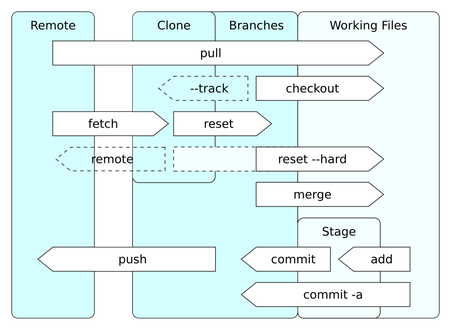
A published diagram of common Git operations. Image: Daniel Kinzler; CC BY 3.0.