Lossless Compression: Making a File Smaller Without Losing Its Contents
How can a smaller file contain exactly the same information as a larger one? The answer is often about representation. Lossless compression replaces a sequence of data with a more compact description that a compatible program can reverse. The goal is to recover the original bytes exactly, which matters when even one changed character would alter the meaning of a document or program.
Describing Patterns More Efficiently
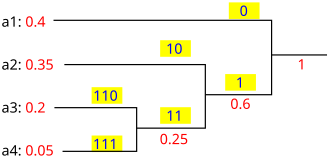
The DEFLATE specification, written by Peter Deutsch, combines two techniques: LZ77 and Huffman coding. One can describe repeated sequences by referring back to an earlier occurrence. The other assigns codes according to the symbols being represented. Together, they provide a way to express many inputs with fewer bits.
A simple classroom analogy is a list that repeats the same phrase many times. A writer might record the phrase once and then provide instructions about its repeated appearances. A reader who understands those instructions can reconstruct the full list. Real compression works with bytes and precisely defined rules, rather than relying on a person's interpretation.
This distinction explains why compatibility matters. A short description is useful only when the receiving program knows how to turn it back into the original data.
Compression Is a Process
The zlib project's usage example separates compression from decompression. Data passes through a compressor, while the corresponding decompressor reconstructs it. The example also processes input in chunks, showing that software does not necessarily need to hold an entire large file in memory at once.
Imagine a school archiving a collection of text records. If the records contain repeated patterns, a smaller archive might reduce storage and the amount of data transferred. The school would still need software that can read the archive and a procedure for checking that important records can be restored.
The usefulness of compression therefore includes the return journey. Saving space today is only part of the task if the file must be opened years later.
Why Some Files Shrink More Than Others
Deutsch's specification explains that no lossless compression method can make every possible input smaller. Some inputs can even grow slightly because the compressed representation includes additional structure. That is a mathematical limit, rather than evidence that one particular compressor is broken.
For a practical comparison, imagine testing two sets of files and finding very different reductions. It would be misleading to promise the better result for every future file. A sensible evaluation measures representative material and includes the time needed to compress and restore it.
The same reasoning discourages judging a system by one impressive demonstration. A smaller output is valuable when it remains usable and the work required to produce it fits the application.
Summary
Lossless compression saves space by changing how data is described while preserving an exact route back to the original. Its effectiveness depends on the input, the format, and the software that reads it. The most meaningful result is a file that is smaller when possible and still reliably recoverable when needed.
Works Cited
Deutsch, Peter. “DEFLATE Compressed Data Format Specification Version 1.3.” May 1996. Accessed 10 Oct. 2026.
Adler, Mark. “zlib Usage Example.” n.d. Accessed 10 Oct. 2026.
Alessio Damato. “Huffman coding example.” Wikimedia Commons, 18 May 2007. Image. CC BY-SA 3.0. Accessed 10 Oct. 2026.
A Huffman coding example, illustrating one approach to lossless compression. Image: Alessio Damato; CC BY-SA 3.0.