Optical Character Recognition: Turning a Picture of Words Into Text
A photographed page can be easy to read and still be difficult for a computer to search. The image records the appearance of the words, while a searchable text file records the characters themselves. Optical character recognition, or OCR, attempts to bridge that gap. It is useful precisely because capturing a page and understanding its text are different tasks.
Recognizing Text in an Image
Google Cloud's Vision documentation describes OCR capabilities for detecting text in images, including dense document text and handwriting. Its text-detection features can return recognized words and information about where they occur in an image.
That location information matters when the arrangement of a page contributes to its meaning. A heading, a caption, and a paragraph may contain readable characters but serve different purposes. Extracting words is one stage in turning an image into information that another program can use.
Imagine a school digitizing old event programs. OCR could make the recognized text searchable so readers can look for a particular name. Staff would still need to preserve the original page and determine whether the extracted result represents it accurately. The hypothetical application is about improving access to a collection, rather than rewriting its history.
The Image Affects the Result
The Tesseract OCR project's documentation describes several image-quality factors that influence recognition. It discusses rescaling, noise, and the effects of page skew. A tilted scan can interfere with the program's identification of text lines.
This means that a disappointing OCR result may begin with the input. A clearer, straighter image can be more useful than repeatedly processing the same poor scan. Tesseract's guidance also discusses page-segmentation choices, reflecting the importance of knowing whether an image contains a full page or a smaller region of text.
For the event-program collection, a consistent scanning process could therefore matter as much as selecting the recognition software. The system is a chain that includes capture, processing, and review.
Searchable Does Not Mean Verified
Suppose a recognized name contains one wrong letter. A reader may fail to find it in a search, even though the original image is perfectly readable. A number or date could create a different kind of misunderstanding.
These examples show why the required accuracy depends on the application. A rough search index and a carefully verified transcript do not have the same standards. A project should state which result it provides and make it possible to consult the original when an uncertain passage matters.
Summary
OCR converts visible writing into machine-readable text, opening possibilities for searching and processing scanned material. Its success depends on image quality, layout handling, and review of the extracted characters. The most dependable workflow connects the convenience of searchable text with a preserved original that readers can check.
Works Cited
Google Cloud. “Detect and Extract Text from Images.” n.d. Accessed 10 Oct. 2026.
Tesseract OCR. “Improving the Quality of the Output.” n.d. Accessed 10 Oct. 2026.
Юкатан. “Russian postal codes.” Wikimedia Commons, 28 March 2016. Image. CC BY-SA 4.0. Accessed 10 Oct. 2026.
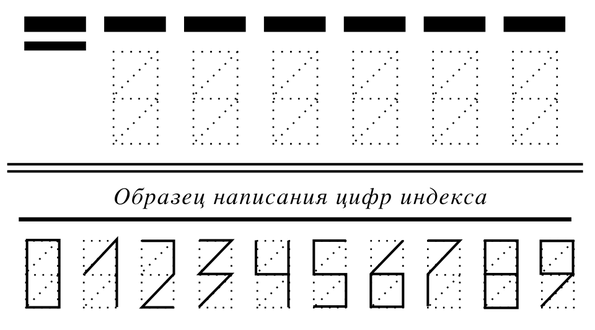
Digit-writing templates used on Russian postal forms for automated recognition. Image: Юкатан; CC BY-SA 4.0.