Software Containers: Packaging an Application’s Working Environment
Why does an application work on one computer and fail on another? Its code may be identical, while the programs and libraries around it differ. Software containers address part of this problem by giving an application a defined environment in which to run. Their value becomes clearer when we look at the difference between packaging that environment and actually operating it.
The Application and Its Surroundings
Docker's documentation describes a container as an isolated process. An application with several components can run them in separate containers, each with the environment that component needs. A frontend, a service that handles requests, and a database do not have to depend on one undifferentiated collection of installed software.
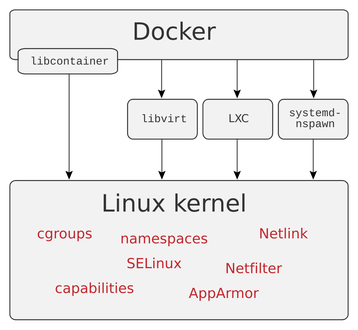
Containers differ from full virtual machines. Docker explains that containers share the host operating system's kernel, while a virtual machine includes its own operating system. This distinction helps explain their architecture; it does not mean every container can run unchanged on every kind of computer.
Think of a student team building a website. One member has a newer library installed than another, and the difference creates a confusing error. A defined container environment can give both members a clearer starting point for running the same component. This hypothetical benefit concerns consistency, rather than a guarantee that the application itself is correct.
An Image Is the Package
Docker describes a container image as a package containing the files, libraries, binaries, and configuration required to run a container. Images are built from layers and are immutable once created. To change the package, developers build a new image or add a new layer.
The image and the running container are therefore different things. An image provides the prepared environment; a container is the process using that environment. Keeping the distinction clear helps a team understand whether it is discussing the package it distributes or the program currently running.
In the school website example, sending a teammate the agreed image could make the environment easier to reproduce. The team would still have to supply the correct configuration and make sure its components communicate as intended.
Operating the Complete Application
A successful demonstration on a developer's laptop leaves practical questions unanswered. Where will the application keep information that must survive a restart? What resources does it require? How will a team determine which image version is in use?
These are questions about operating the product, and the container format alone cannot answer them. The sensible approach is to test the complete arrangement in the environment where it will be used. A repeatable package is most useful when the surrounding decisions are repeatable as well.
Summary
Software containers help define and separate an application's working environment. Images package that environment, and containers run it as isolated processes. The technology can reduce confusion about dependencies, but its usefulness depends on matching the package, configuration, and operating conditions to the actual job the application must perform.
Works Cited
Docker. “What Is a Container?.” n.d. Accessed 10 Oct. 2026.
Docker. “What Is an Image?.” n.d. Accessed 10 Oct. 2026.
User:Maklaan. “Docker-linux-interfaces.” Wikimedia Commons, 22 January 2015. Image. Public domain. Accessed 10 Oct. 2026.
Published Docker architecture illustration from 2015. Image: User:Maklaan; Public domain.